Old versions
Your Acumatica ERP database stores thousands of old file versions and revisions you'll never need
Update
To book a demonstration or request more information, please continue to the ERP App Marketplace product page

Bulk delete old file versions and attachments.
Back them up to your cloud before cleanup

Your Acumatica ERP database stores thousands of old file versions and revisions you'll never need
Acumatica system performance slows down as files and attachments pile up
Manual file deletion in Acumatica is risky, as you might delete something important
Cleaning up Acumatica files one by one takes hours of valuable time

Before deletion, AcuCleaner lets you save files to Google Drive, Dropbox, or OneDrive.
You can customize your preferences on a separate screen (we’ll show it during your training)
Clean selected files now
Or set up recurring automated cleanup
Speed up deletion for large batches
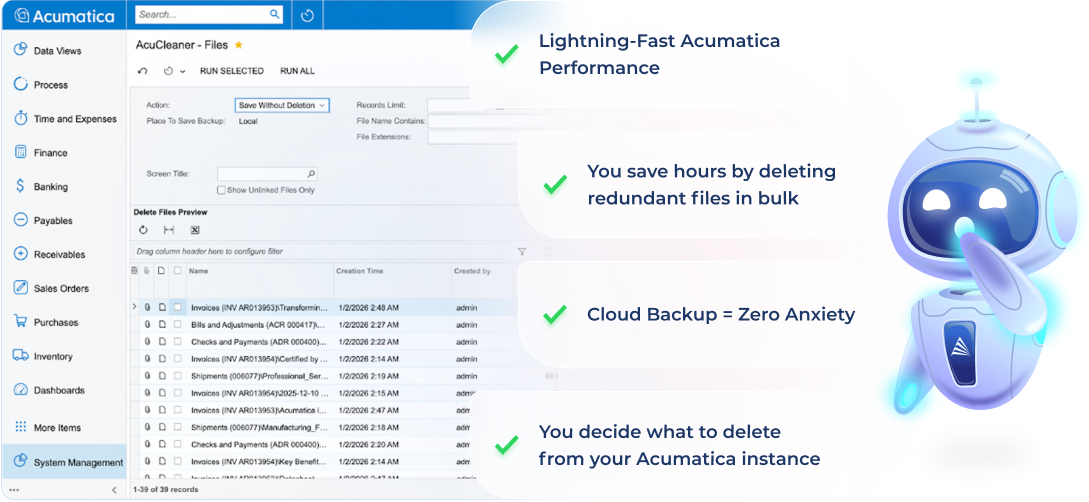




AcuCleaner includes cloud backup before deletion. You can configure the tool to save all files to Google Drive, Dropbox, or OneDrive before they're removed from your Acumatica system. This gives you a complete safety net. If you need any deleted files, you can recover them from your cloud storage.
Additionally, AcuCleaner has a "Save Without Deletion" action mode that lets you test your filters and see exactly what would be backed up before actually deleting anything.
No. AcuCleaner has a built-in "Exclude Customization Files" checkbox that's specifically designed to protect your Acumatica customization packages. This safety feature ensures that critical system files are never accidentally deleted during cleanup operations.
You can receive this solution within 24 hours. And you can choose where it should be installed - your instance or a dedicated sandbox.
AcuCleaner can remove:
AcuCleaner provides multiple filter options:
Yes. You can view all revisions of a file and delete old versions while keeping the most recent one. This is perfect for cleaning up files that have been modified multiple times over the years.
Yes. AcuCleaner includes a separate Delete Emails module that lets you remove old emails and their attachments from your Acumatica system.
Yes. Removing redundant files and old versions reduces database bloat, which can improve:
The impact depends on how many unnecessary files you're storing. Customers typically notice improved performance after removing 30GB+ of old data.
Yes. AcuCleaner integrates with Acumatica's native Automation Schedules feature. You can set up recurring cleanup tasks to run automatically:
Many customers set up quarterly or annual automated cleanup to maintain a lean system year-round.
You can do both. Use the "RUN ALL" button to delete all filtered files at once. Or choose specific files and use "RUN SELECTED". This flexibility lets you either mass-clean old files or carefully handpick which ones to remove.
Each tool targets a specific type of Acumatica database bloat:
AcuCleaner focuses on file storage optimization, clearing out old attachments, redundant file versions, orphaned documents, and accumulated emails that consume database space.
AcuPurge tackles audit trail management, removing historical records of data modifications across your Sales Orders, Inventory, Financial records, and other modules.
AcuTrace addresses system activity logs, cleaning up login records, screen access history, logout traces, and failed authentication attempts.
Think of it this way: AcuCleaner empties the file cabinet, AcuPurge clears the change log, and AcuTrace cleans the visitor registry. Each addresses a distinct performance bottleneck. Most growing Acumatica implementations eventually need all three tools working together.
If file storage is your main issue, AcuCleaner standalone works great. You'll recover database space and speed up backups immediately.
That said, file bloat rarely exists alone. Systems with years of attachments usually also have extensive audit history (AcuPurge's domain) and thousands of login traces (AcuTrace's speciality).
The bundle advantage: Better pricing than buying separately, plus complete coverage as your optimization needs grow.
Reach out to discuss bundle pricing [email protected]
Update
To book a demonstration or request more information, please continue to the ERP App Marketplace product page
Let's talk about: